
Guide
How antivirus detection actually works
How this page is funded
veratis.online is funded by affiliate commission earned on partner links elsewhere on this site. This guide contains no commercial links and recommends no product. Our funding and independence rules are set out in the editorial policy.
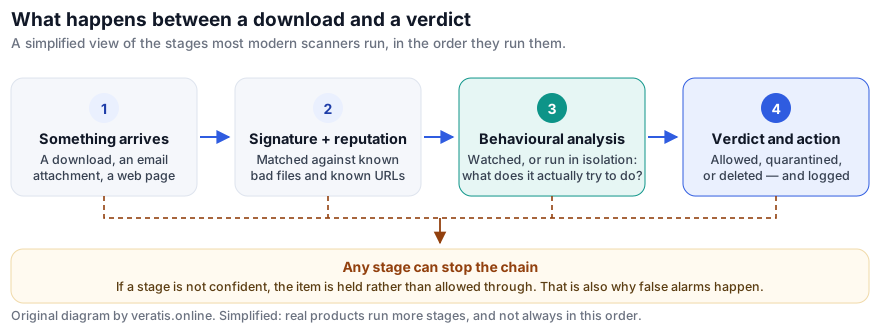
Signature matching — the thing most people picture when they hear “antivirus” — is the first and least interesting of four stages. Here is what the other three do, and why the last one is both the reason modern scanners catch brand-new malware and the reason they occasionally quarantine your backup software.
Stage 1: signatures and hashes
The oldest technique and still the cheapest. The scanner computes a fingerprint of a file and compares it against a list of fingerprints known to belong to malware, or looks for short characteristic byte sequences inside it.
What it catches: anything already catalogued. This is a large proportion of what actually circulates, because most attacks reuse commodity malware.
What it misses: everything new. Attackers know about hashing, and automatically repack and re-encrypt their payloads so that every victim receives a byte-different file. A pure signature scanner is permanently one step behind by design, which is why nobody ships one any more.
Stage 2: reputation and telemetry
The vendor maintains a view of how common a file is across its whole installed base. A binary seen on twelve million machines for three years is almost certainly a legitimate application. One that first appeared forty minutes ago on six machines in two countries is treated with suspicion regardless of what it contains.
The same idea is applied to web addresses and to the certificates used to sign software.
What it catches: the rarity that is inherent in targeted and freshly generated malware. It also provides a fast route to trusting the overwhelming majority of files without deeper inspection, which is where most of a scanner's speed comes from.
What it misses: malware delivered inside something already widely trusted. A compromised update to a popular application is the hardest case in all of endpoint security, precisely because reputation says it is fine.
The privacy trade-off, stated plainly: reputation requires the vendor to know which files are on your machine, at least as hashes. That is a genuine cost, it is in every major vendor's product, and the vendor's own privacy documentation is the place to read what is sent.
Stage 3: heuristics, behaviour and sandboxing
This is the stage that does the real work against threats nobody has seen before, and it comes in two forms.
Static heuristics examine a file without running it, looking for structural signs of malice: code that decrypts itself at runtime, a tiny executable carrying a large encrypted blob, imports of the specific system functions used for process injection, a document containing a macro that downloads something.
Dynamic or behavioural analysis watches what the code does once it runs — either in a sandbox, an isolated environment where its actions can be observed and discarded, or on the live system with the ability to roll back. The scanner is watching for sequences such as: enumerating and encrypting files across many folders in quick succession; deleting Windows shadow copies; injecting into another process's memory; installing a persistence mechanism; or opening a connection to an address with no reputation.
What it catches: novel malware, because behaviour is much harder to vary than appearance. Ransomware in particular has a very recognisable signature of activity even when it has none of file content.
What it misses: malware that detects it is being observed and does nothing interesting until later — sandbox evasion is an entire research field — and attacks that use only legitimate tools already present on the system.
Stage 4: the verdict, and why false alarms happen
Stages two and three produce probabilities, not facts. The scanner must convert them into one of three actions: allow, quarantine, or delete. Quarantine — moving the file somewhere it cannot run, reversibly — exists precisely because the vendor knows the judgement might be wrong.
A false positive is the direct consequence of tuning stage three to be sensitive. The programs that get hit are the ones whose legitimate behaviour resembles malicious behaviour: backup tools that read every file on the disk, disk encryption utilities, system cleaners, installers that unpack themselves, remote support tools, and software written by small developers who cannot afford a code-signing certificate with established reputation.
This is why a detection percentage alone is marketing
Any product can reach a very high detection rate by flagging aggressively. The number only means something alongside the false-positive count from the same test. A product with 99.9% detection and 4 false alarms and one with 99.9% detection and 60 false alarms are not the same product. Reputable laboratories publish both; vendor marketing frequently quotes only the first.
What this means when you are choosing software
- Raw detection no longer separates the leaders. The top consumer products cluster very tightly. Differences in performance impact, false alarms, interface quality and renewal pricing are far larger than differences in detection.
- Read both numbers, from a lab that publishes its method. AV-TEST and AV-Comparatives both do, and both publish free summaries.
- Check what the test actually covered. Labs test a named product version on a named platform in a named month. A result for a vendor's flagship suite is a reasonable guide to its cheaper tier, because the engine is usually shared, but it is not a result for that tier.
- Never add an exclusion because an installer told you to. That instruction, from anything other than your own IT department, is the attack far more often than it is a genuine false positive.
Sources and further reading
- AV-TEST GmbH, test methodology and current results — av-test.org
- AV-Comparatives, methodology for Real-World Protection and Malware Protection tests — av-comparatives.org
- ENISA, Threat Landscape reports — enisa.europa.eu
Written by Linda Jones for veratis.online. If you spot an error, please write to info@veratis.online — see the corrections procedure. Where this guide and a vendor’s own published information diverge, the vendor’s information prevails.