
Security software · Buyer's guide
Norton AntiVirus Plus reviewed: what it actually includes, and what it leaves out
How this page is funded
This is an advertisement-funded review. Every button on this page marked “partner link” is an affiliate link: if you buy after following one, Divine Intent s.r.o. receives a commission from the retailer. You pay exactly the same price either way, and we receive nothing if you do not buy. No advertiser was shown this article before publication, and no advertiser can change its conclusions — including the section below listing what this product does not do. Our full funding and independence rules are in the editorial policy.
Norton AntiVirus Plus is the cheapest tier Norton sells, and it is widely mis-described — including, until this revision, on this page. It does not include a VPN. It does not include dark web monitoring. It covers one device, not five. Here is what it actually does, how antivirus detection works underneath, and when you should ignore this tier and buy something else.
Does a separate antivirus still make sense?
It is a fair question, and the honest answer is: less often than antivirus marketing suggests, but more often than the “just use Defender” crowd suggests.
Modern operating systems ship with real protection. Windows includes Microsoft Defender Antivirus, which is enabled by default and which independent labs score well. macOS has XProtect, Gatekeeper and notarisation. Both platforms sandbox applications and both block unsigned code by default. A careful user running an up-to-date system, with automatic updates on and a password manager in use, is not defenceless.
What a paid suite adds is mostly breadth rather than a fundamentally better scanner: a firewall with per-application rules, web and scam filtering applied before a page loads, a password manager, backup, and one vendor to call when something goes wrong. Whether that breadth is worth paying for depends entirely on who is using the machine. For a cautious, technical user, often not. For a shared family computer, or a laptop used by someone who will click the delivery notification, usually yes.
The honest version
Antivirus software reduces risk. It does not eliminate it, and no product can. Anyone promising that you will never be infected is selling you something. What you are buying is a lower probability and a faster recovery — which is worth real money, but is not the same as safety.
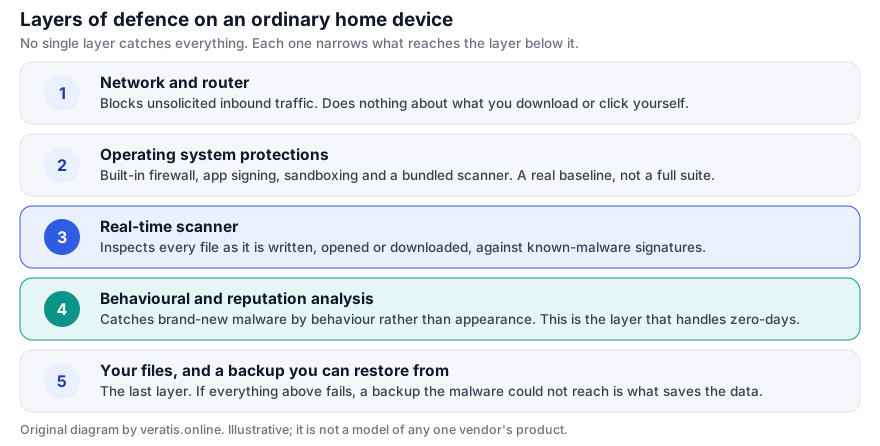
Where antivirus sits among your other defences
Security on a home device is layered. No layer catches everything; each one narrows what reaches the next. The diagram below shows the order, and what each layer is and is not good at. All illustrations on this page are original SVG drawings made by us for this article.
How detection actually works
“Antivirus” is a misleading name for what the software now does. Signature matching — comparing a file against a list of known-bad fingerprints — is still there, but it is the first and least interesting stage. It can only recognise malware somebody has already seen and catalogued, and attackers regenerate their payloads constantly for exactly that reason.
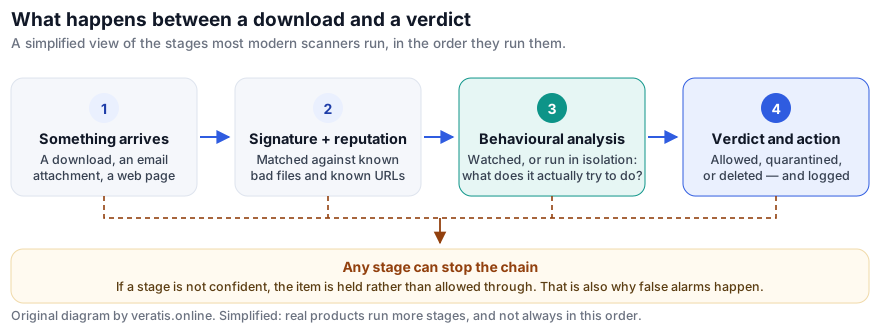
The stages, in plain terms:
- Signature and hash matching. Fast, cheap, and completely reliable — for malware that is already known. Useless against anything new.
- Reputation and telemetry. The vendor has seen this file on millions of machines, or has never seen it before anywhere. A file that appeared an hour ago on four computers is treated with far more suspicion than one installed on ten million.
- Heuristic and behavioural analysis. The file is examined, or executed in an isolated environment, and judged by what it attempts: encrypting files in bulk, injecting into other processes, disabling recovery options, contacting a command server. This is the layer that catches genuinely new malware, and the reason a scanner will occasionally quarantine a perfectly innocent program that does unusual things — backup tools and developer utilities are common casualties.
- Verdict and action. Allow, quarantine, or delete, with a log entry. Good products make the quarantine easy to inspect and reverse, because they know stage three is probabilistic.
This is why “detection rate” is a slippery figure. A product can look excellent on a test set of known samples and perform differently against a live attack chain; and a product tuned for maximum detection will also flag more harmless files. Serious test labs measure both numbers together, which is why you should never trust a detection percentage quoted without its false-positive count.
See Norton AntiVirus Plus pricingPartner linkWe earn a commission if you buy through this link. It costs you nothing extra and does not change the price you pay.
The routes malware actually takes
It is worth being concrete about how infections start, because the picture most people carry — a hacker attacking their computer — is almost never what happens. Nearly all consumer infections begin with someone being persuaded to do something.
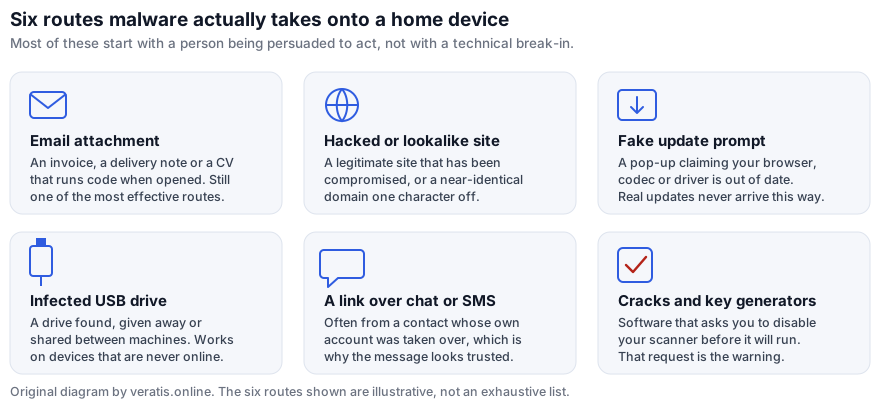
The sixth — cracked software asking you to add an exclusion or turn off real-time protection before it will install — deserves singling out. That instruction is not a workaround for an over-sensitive scanner. It is the attack.
What Norton AntiVirus Plus includes
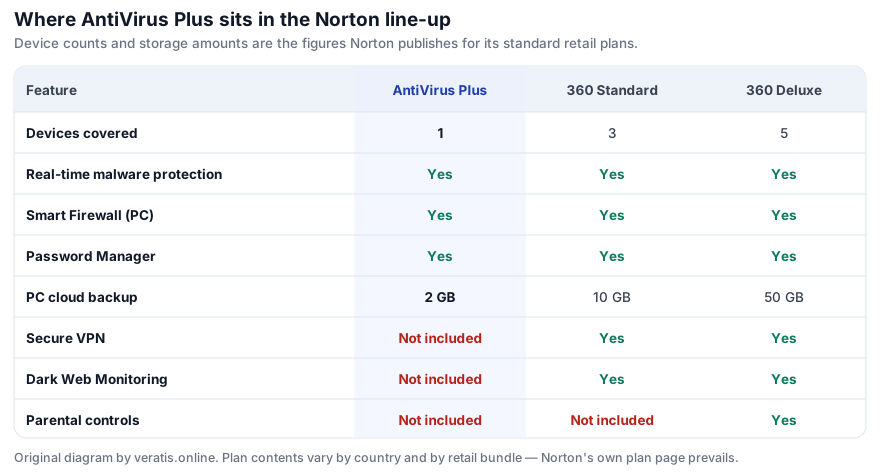
Norton AntiVirus Plus is the entry tier of the Norton consumer range. According to Norton's own product and comparison pages, a standard subscription covers one device and includes:
- Real-time threat protection — the multi-layered scanning engine described above, shared with the more expensive Norton 360 tiers. The engine is the same; the tiers differ in what is bundled around it.
- Smart Firewall (on Windows) — monitors inbound and outbound connections per application rather than relying on the router alone.
- Password Manager — a vault with browser auto-fill, so you can use a different password on every account. For most people this reduces real-world risk more than the scanner does, because credential reuse is how one leaked site turns into five compromised accounts.
- 2 GB of PC Cloud Backup — Windows only. Two gigabytes is enough for documents and tax records. It is not enough for a photo library, and you should not plan around it as your only backup.
- Scam and phishing protection — Norton markets an AI-assisted scam-detection feature in current versions of its consumer products.
- Ransomware protection — behavioural blocking of mass-encryption activity.
- The Virus Protection Promise — Norton offers to help remove a virus from a protected device, and a refund if it cannot. The terms and eligibility conditions are Norton's and you should read them before relying on this.
What it does not include
This is the section that matters most, because the omissions are routinely glossed over in affiliate write-ups — this one included, before it was corrected.
- No VPN. Norton Secure VPN is not part of AntiVirus Plus. It starts at the Norton 360 tiers. If you specifically want a VPN for public Wi-Fi, this plan will not give you one.
- No dark web monitoring. Breach-alerting is a Norton 360 feature, not an AntiVirus Plus one.
- No parental controls. Those are Norton 360 Deluxe and above.
- One device, not several. A single licence covers one device. If you need to cover a laptop and two phones, this is the wrong plan and a multi-device tier will be cheaper than three separate licences.
- Backup is Windows-only and small. 2 GB of cloud backup does not replace a real backup strategy. See the backup guide.
Correction notice
An earlier version of this page stated that Norton AntiVirus Plus included a built-in VPN, dark web monitoring, performance-optimisation tools and coverage for up to five devices, and cited a “99%+ detection rate” and a user count with no source. None of those statements were correct for this product tier. They have been removed and replaced with the plan contents Norton publishes, and with attributed laboratory results. See the corrections procedure.
We earn a commission if you buy through this link. It costs you nothing extra and does not change the price you pay.
What independent lab scores do and do not tell you
Two European laboratories dominate independent antivirus testing: AV-TEST in Magdeburg and AV-Comparatives in Innsbruck. Both publish their methodology and their raw results, which is the reason to pay attention to them rather than to vendor-commissioned benchmarks.
In AV-TEST's Windows home-user rounds through 2025 and into 2026, Norton's consumer product has repeatedly scored the maximum 6 points in each of the three categories AV-TEST measures — protection, performance and usability — earning its “Top Product” designation. In AV-Comparatives' Malware Protection Test of September 2025, Norton recorded a protection rate of 99.98% with 8 false alarms.
Three caveats, which matter:
- The labs test “Norton 360”, not “AntiVirus Plus” by name. The detection engine is shared across the consumer range, so the protection result is a reasonable guide to what AntiVirus Plus does. It is not a tested result for that SKU specifically, and we will not present it as one.
- Scores are a snapshot. They describe the samples circulating during one test month. Check the current round rather than relying on a figure quoted in an article — including this one.
- Nearly every major product scores well now. The gap between the top ten consumer products on raw detection is small. Performance impact, false alarms, interface quality, upselling behaviour and renewal pricing differentiate them far more than detection does.
Ransomware, and why backups are the real answer
Ransomware is the threat most worth planning for, because it is the one where software alone genuinely cannot save you. The sequence matters more than most coverage admits.
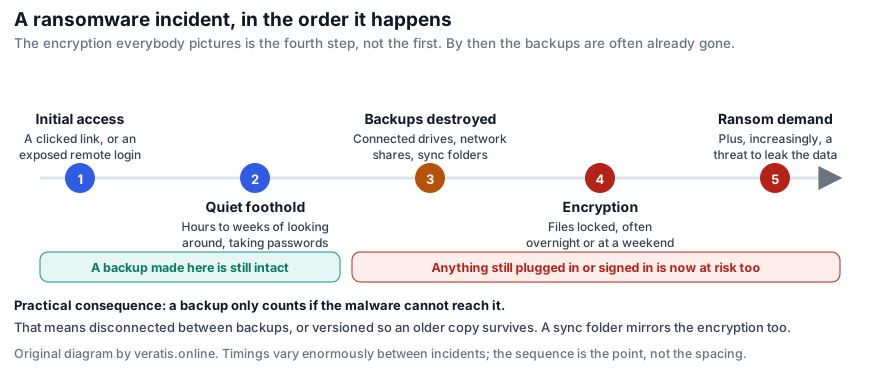
The practical consequence is simple and is not a product recommendation: a backup only counts if the malware cannot reach it. An external drive left permanently connected will be encrypted. A sync folder will faithfully mirror the encryption to the cloud. What survives is a drive that is physically disconnected between backups, or a backup service that keeps versioned history you can roll back. Norton's 2 GB is a small piece of that, not a substitute for it.
How to judge any security suite
If you are comparing products rather than taking a recommendation, these are the questions worth asking, roughly in order of how much they will affect your experience:
- Renewal price
- Almost every consumer suite is sold at a heavy first-year discount and renews at a much higher price. Find the renewal figure before you buy, not twelve months later.
- Devices and platforms
- Count what you actually need to cover, including phones. Feature parity between the Windows, macOS, Android and iOS builds is rarely complete.
- Independent test results
- Protection and false positives and performance impact, from a lab that publishes its methodology. Any one figure alone is marketing.
- Performance impact
- Matters most on older or low-memory machines. AV-Comparatives publishes a dedicated performance test.
- Upselling behaviour
- Some suites nag persistently to buy the next tier. This is a real daily cost of ownership and it is rarely mentioned in reviews.
- Cancellation and auto-renewal
- How easy is it to turn auto-renewal off, and how is a refund obtained? Check before purchase.
- What you would be double-paying for
- If you already have a password manager and a backup service you trust, a bundle's extra features are worth nothing to you.
Who this tier suits — and who should skip it
Reasonable fit
- One Windows PC, used by one person, where you want a firewall and a password manager bundled with the scanner.
- Someone who wants a single vendor and a support line rather than assembling separate tools.
- A machine used by someone who is likely to click things, where web and scam filtering earns its keep.
Buy something else
- You need to cover more than one device. Go straight to a multi-device tier.
- You want a VPN. This plan does not have one. Either buy a Norton 360 tier or buy a standalone VPN from a provider you have chosen on its own merits.
- You want breach alerts or parental controls. Norton 360 tiers.
- You run a business with several machines. A consumer licence is the wrong instrument; look at managed endpoint products.
- You are a careful, technical user on an up-to-date system. Defender plus a password manager plus a real backup may genuinely be enough, and costs less.
We earn a commission if you buy through this link. It costs you nothing extra and does not change the price you pay.
Before you buy: renewal prices and your EU rights
Two things we think any funded review has an obligation to state plainly:
Introductory pricing. Norton, like its competitors, advertises a first-term price well below the renewal price, and subscriptions renew automatically by default. We deliberately do not quote prices on this page: they differ by country, currency, retail bundle and promotion, and a figure written here would be wrong somewhere within weeks. Read the price and the stated renewal price on the vendor's own checkout page before you commit.
Your right of withdrawal. If you are buying as a consumer in the EU, the Consumer Rights Directive gives you a 14-day right of withdrawal on distance contracts. For digital content delivered immediately, that right can be lost if you expressly consent to immediate performance and acknowledge the loss — which is exactly what the checkbox at checkout usually does. Vendors frequently also operate their own, more generous, money-back period. Check which applies to your order.
Trademark notice. veratis.online is an independent, advertising-funded publication. It is not affiliated with, endorsed by, sponsored by or otherwise connected to Gen Digital Inc., NortonLifeLock or any other company named on this site. “Norton”, “Norton AntiVirus Plus” and “Norton 360” are trademarks of their respective owners and are used here only to identify the product being described. Product names, features, prices and plan contents are those published by the vendor; where this page and the vendor’s own information diverge, the vendor’s information prevails.
Sources
Everything factual on this page traces to one of the following. Where our description and the vendor's own published information diverge, the vendor's information prevails.
- Norton, product and plan comparison pages for Norton AntiVirus Plus and Norton 360 (us.norton.com/products/norton-360-antivirus-plus, plan comparison) — plan contents, device counts, cloud-backup amounts, Virus Protection Promise.
- AV-TEST GmbH, Windows home-user test rounds, 2025–2026 (av-test.org) — protection, performance and usability scores.
- AV-Comparatives, Malware Protection Test, September 2025, and Performance Test, September 2025 (av-comparatives.org) — protection rate and false-alarm count.
- Directive 2011/83/EU on consumer rights, Articles 9 and 16(m) — right of withdrawal and its exceptions for digital content.
Figures quoted from testing laboratories were current at the time of writing and are superseded by each laboratory's latest published round. If you find an error on this page, please write to info@veratis.online; our corrections procedure explains what happens next.