
Guide
How to spot a phishing message
How this page is funded
veratis.online is funded by affiliate commission earned on partner links elsewhere on this site. This guide contains no commercial links and recommends no product. Our funding and independence rules are set out in the editorial policy.
Nearly every consumer malware infection and account takeover starts the same way: someone is persuaded to click. The persuasion follows a small number of patterns, and once you can name them they are hard to unsee.
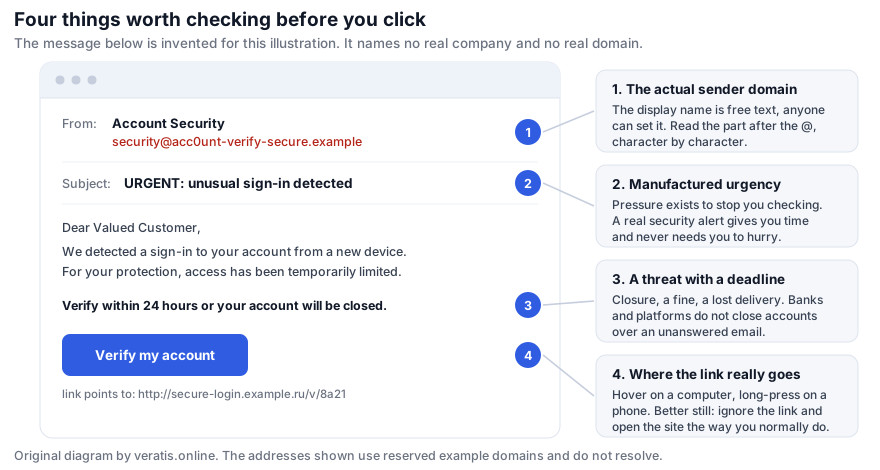
Check 1: the part of the address after the @
The sender's display name — “Account Security”, “DHL Delivery”, your own bank's name — is free text. Anyone can set it to anything. It is not evidence of anything at all.
What matters is the domain after the @, and it must be read character by character. Common
tricks: a hyphen inserted into a real brand name; a zero for an o or a one for an l; a real brand
name as a subdomain of something else, as in
yourbank.security-update.example, where the actual domain is
security-update.example; and a top-level domain that is wrong for the organisation.
On a phone, mail apps usually hide the address entirely and show only the display name. Tap it to expand. This single habit catches a large share of attempts.
Check 2: urgency that has no good reason to exist
Pressure is the functional core of phishing. It exists to stop you doing exactly what this guide describes. “Within 24 hours”, “immediately”, “final notice”, “your account will be suspended”.
Genuine security notifications from banks and platforms are almost always the opposite: they inform you that something happened and tell you to check your account at your convenience, usually by logging in the way you normally do rather than through a link.
Check 3: a threat, a fine, or a prize
Account closure, a parcel held at customs, an unpaid toll, a tax refund, a suspicious login needing confirmation. All work by making you want to resolve something quickly.
The test is simple: would this organisation really handle this by email, with a deadline? Tax authorities do not demand payment by email. Couriers do not charge a €1.80 redelivery fee by SMS. Banks do not close accounts because an email went unanswered.
Check 4: where the link really goes
Link text is just text. “https://yourbank.example/login” can point anywhere.
- On a computer: hover over the link without clicking and read the destination in the status bar at the bottom of the window.
- On a phone: press and hold the link until a preview appears. Do not tap.
- Either way: read the domain in the destination using the rule from check 1.
The reliable habit, and the one worth building, is to ignore the link entirely. If the message might be real, open the organisation's site the way you normally do — your own bookmark, your password manager, or the app — and look for the notification there. If it is genuine it will be waiting for you. This defeats every variation at once, including ones that pass all four checks above.
Why a password manager helps here
A password manager matches your saved credentials against the domain of the page you are on. On a lookalike domain it will simply not offer to fill anything. That silence is a far more reliable signal than your own reading of the address bar, and it works when you are tired or in a hurry — which is exactly when phishing works.
Things that do not prove a message is genuine
- A padlock in the address bar. It means the connection is encrypted, not that the site is honest. Phishing sites have valid certificates; they are free.
- Correct logos and formatting. Copied in seconds from the real site.
- Good spelling and grammar. The old advice about clumsy translation is obsolete.
- Knowing your name, or the last four digits of a card. Frequently available from a previous data breach.
- Arriving in a reply to a thread you recognise. Thread hijacking, from a contact whose mailbox was compromised, is common and is the hardest variant to catch.
If you already clicked, or already typed your password
- Change that password immediately, from a different device if you can, going to the site directly rather than through any link. Change it anywhere else you reused it — this is the step people skip and the one that causes the cascade.
- Turn on two-factor authentication on that account if it is not already on. An app or a hardware key is stronger than SMS.
- Check the account's active sessions and security settings for devices you do not recognise, forwarding rules you did not create, and changed recovery addresses. Attackers add a mail forwarding rule early, and it survives a password change.
- If you downloaded or ran anything, disconnect the device from the network and run a full scan. If it is a work device, tell your IT department now rather than later; the delay is what turns an incident into a breach.
- If financial details were entered, contact your bank or card issuer and report it. Speed matters for reversibility.
- Report it. Most mail clients have a “report phishing” action, and most EU countries have a national reporting point; ENISA maintains the directory.
And do not spend energy on embarrassment. These messages are designed by people who test them on thousands of targets and keep what works.
Sources and further reading
- ENISA, Threat Landscape — phishing and social engineering trends — enisa.europa.eu
- Example domains used in this guide are reserved by RFC 2606 and RFC 6761 and do not resolve.
Written by Linda Jones for veratis.online. If you spot an error, please write to info@veratis.online — see the corrections procedure. Where this guide and a vendor’s own published information diverge, the vendor’s information prevails.